Posts tagged: networking
Broken IPv6 network — multiple devices sending IPv6 RA
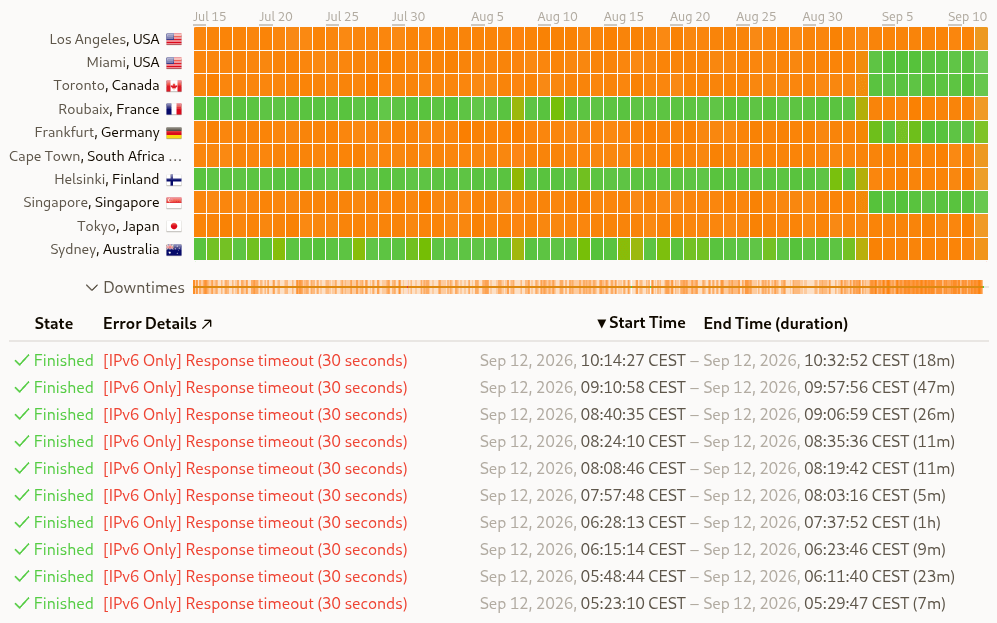
Back in early June I started getting emails from updown.io warning me of IPv6 ping issues to my CHR edge router. I didn’t notice anything wrong, and everything seemingly worked just fine, so I muted …
Home network v2 — the never-ending story

Back in 2021 I started to tag posts with Home network v2, and wrote about my plans to improve my home network. The year after — there was even an updated plan! Then it evolved into a series, with the …
Netdata warnings — tracking down dropped packets

When I was trying out Netdata last year — I noticed I had lots of inbound_packets_dropped_ratio warnings, on multiple nodes. Time to investigate 👇
Finally getting fiber between the house and garage

Getting network to the garage is a story with many chapters. I started out with Wi-Fi mesh, then CAT6 — and now, finally, fiber!
Optimizing WireGuard on MikroTik CHR

I’ve been having a strange problem with outgoing WireGuard traffic, the problem has probably always been there — I just haven’t noticed, until now. Outgoing WireGuard traffic is very slow, while …
Chasing MikroTik CHR bottleneck

While doing some WireGuard testing between local peers; I noticed weird performance issues on my virtual MikroTik router. This lead me down a rabbit hole of testing the layer 3 throughput on my …
Running CAT6 to the 2nd floor den — another interior wall

I first got started on the network run from the attic switch to the 2nd floor den — back in October of 2021. I finished it a year later, so it’s about time to get this blog post published 😛
Running CAT6 to the twins' rooms — inside interior wall

We recently moved the twins into their own bedrooms, after sharing a room for nine years — it was finally time for some privacy 🙂 With their own rooms; they also got their own computers — a life long …
Pulling CAT6 cable in existing conduit

We recently put up a wall in our previous family/play room — to make another bedroom, with a hallway outside. I might want an access point in that hallway at some point. So I repurposed a telephone …
Knot Resolver — with ad blocking

I stumbled onto NextDNS recently — it’s like a cloud hosted Pi-hole. I tried it for a few days, but this post isn’t about that. Reading about the different block lists in NextDNS, and digging deeper …
D-Link DGS-1210-28P initial setup

The Unifi UAP-AC-M access point in my garage stopped working a few weeks ago. Or, the device didn’t stop working, it still showed up in the Unifi controller and I could ping it. But it stopped …
Updated plans for my home network

Last year — I wrote about plans for my home network, or home network v2, as I called it. Let’s take a look at what I have done, what remains, and what has changed since then.
A few Wi-Fi improvements

After my Wi-Fi mapping adventure — I found a few spots with low Wi-Fi signal. Both kids’ rooms on the 2nd floor only had mediocre signal, at -67 and -68 dBm 2.4 GHz, and the side garden had -71 dBm — …
Setting up a virtual VyOS router

I’ve had many routers over the years — Linksys WRT54GL, Linux and iptables, ASUS RT-N66U, Ubiquiti USG, OPNsense, Ubiquiti EdgeRouter, and MikroTik CCR1009. At least those are the ones I can remember. …
Two CAT6 cables and a fiber — from the basement to the attic

Since we first moved into this house — I’ve wanted to ceiling mount a Wi-Fi access point on the 2nd floor. But getting a network cable to the attic was challenging, so instead I opted for a Unifi …
Altibox native dual-stack IPv6 on EdgeRouter

I recently decided to give Altibox and their 6rd implementation another go — searching the interwebs I stumbled upon a Norwegian forum post that read (translation by me): Altibox offers native …
Sharing routes between MikroTik and VyOS — using OSPF

Planning out my new network topology; I wanted to use multiple routers — and have them share routes between them. So I started looking into OSPF. I made a simple lab in EVE-NG, and set up route …
Altibox fiber — straight into Ubiquiti EdgeRouter

Back in August I wrote about connecting my ISP (Altibox) fiber straight into the Mikrotik CCR1009. I’ve since decided not to include the CCR in my network stack, but instead use my EdgeRouter 4 as, …
Moving CAT6 cable for access point; inside the wall

The first network run I did in this house — was to the hallway access point. It ran along the basement stairwell ceiling, through the basement, and into the home office. Since I’m already running …
Running three CAT6 cables to the living room TV bench

Ever since we bought the house, last year, I’ve been planning to run wired network to the living room TV and media center — it’s time to finally get that done 🙂
Running two CAT6 cables to the play room

We recently got a family computer in our play room, and it of course needs network. So I ran a 20 mm conduit from the basement, through the kitchen, to the play room, and pulled two CAT6 cables.
Downgrading Unifi APs from 5.43.43 to 4.3.28
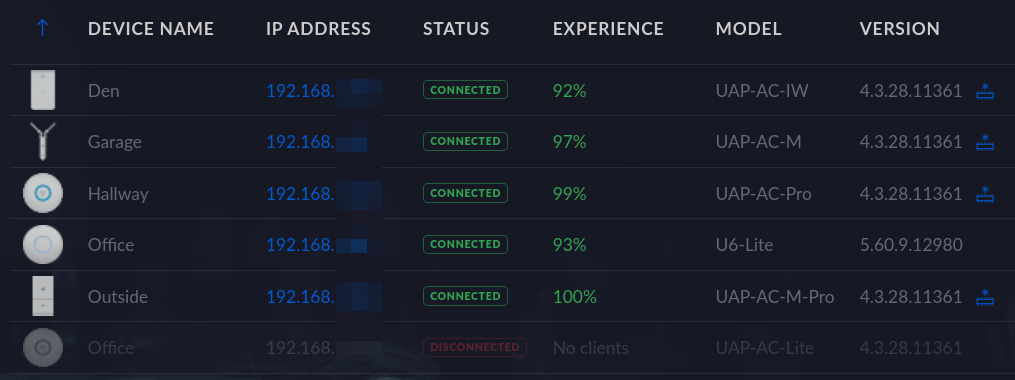
Shortly after I upgraded my Unifi access points from 4.3.28 to 5.43.43; I started getting timeout issues. Not all devices, but some; the Raspberry Pi driving our DAKboard, and both our Netatmo air …
Troubleshooting the garage access point

Ever since I ran a underground CAT6 to my garage — my Unifi UAP-AC-M access point have been acting strange… I initially noticed that whenever I was close to the garage; I would loose internet …
Plans for my home network

I’ve written a few posts now about my Home network v2 project. What’s the plan? Let’s go through that now.
Running underground CAT6 to detached garage

I dug a 10 meter trench to get wired network to my detached garage. Then installed a rack cabinet and PoE switch. Here is the build log 👇