I use Beszel to monitor all my hosts — Raspberry Pi’s, hypervisors, VMs and containers. But a problem arises if the Proxmox host running the Beszel container stops working.
There are two mechanisms in place that makes sure I get notified in case there is a problem with a Proxmox host or Beszel itself. The first is heartbeat monitoring within Beszel itself, should Beszel stop sending out pings to Healthchecks.io — I get notified.
The second method is a health pulse script regularly executed on the Proxmox hosts themselves. Let’s have a look.
The script
The script serves two purposes, doing some simple health checks: quorum, services and ZFS status — and actually sending out the pulse.
Let’s take a look at the script itself:
#!/bin/bash

# Get pulse URL from environment variable
PULSE_URL="${HEALTH_PULSE_URL}"

# Set default status values
QUORUM_STATUS="ok"
SERVICES_STATUS="ok"
ZFS_STATUS="ok"

# Exit if URL is not set
if [ -z "$PULSE_URL" ]; then
    echo "ERROR: HEALTH_PULSE_URL environment variable not set"
    exit 1
fi

# Function to log failures
log_failure() {
    logger -p user.err -t pulse-pve-health "Pulse check failed: $1"
}

# Check 1: Cluster quorum (most critical)
if ! pvecm status 2>/dev/null | grep -q "Quorate.*Yes"; then
    log_failure "Cluster not quorate"
    QUORUM_STATUS="fail"
fi

# Check 2: Critical PVE services
CRITICAL_SERVICES=(
    "corosync"
    "pve-cluster"
    "pvedaemon"
    "pveproxy"
    "pve-ha-lrm"
    "pve-ha-crm"
)

for SERVICE in "${CRITICAL_SERVICES[@]}"; do
    if ! systemctl is-active --quiet "$SERVICE"; then
	log_failure "Service $SERVICE is not running"
	SERVICES_STATUS="fail"
    fi
done

# Check 3: ZFS pool health
while IFS=$'\t' read -r POOL HEALTH; do
    if [ "$HEALTH" != "ONLINE" ]; then
	log_failure "Proxmox health check: ZFS pool $POOL is $HEALTH"
        ZFS_STATUS="fail"
    fi
done < <(zpool list -H -o name,health)

# Send pulse
curl -fsS -m 10 --retry 5 -o /dev/null \
	-X POST \
	-d "quorum=$QUORUM_STATUS services=$SERVICES_STATUS zfs=$ZFS_STATUS" \
	$PULSE_URL
exit 0
The string body of the request sent to Healthchecks.io is plain and simple:
quorum=ok services=ok zfs=ok
Healthchecks.io
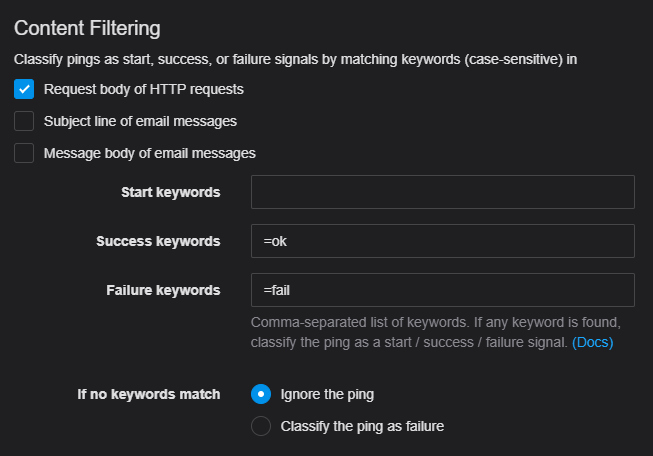
Filtering rules are set up on the Healthchecks.io check:
From the Healthchecks.io documentation:
- It first looks for failure keywords. If any are found, it classifies the ping as a failure signal and does not look further.
- It then looks for success keywords. If any are found, it classifies the ping as a success signal and does not look further.
- It then looks for start keywords. If any are found, it classifies the ping as a start signal.
- Finally, if no matching keywords are found, Healthchecks.io either ignores the ping or classifies it as a failure signal, depending on the If no keywords match configuration option. Ignored pings are shown in the event log with an “Ignored” label, but they do not affect check’s status as they are neither “success” nor “failure” nor “start” signals.
Meaning if any of the health checks fail; the ping is a failure signal and considered down — instant notification.
If no checks failed the ping was successful. If the success keyword is missing altogether the ping is ignored. That should not happen.
If the host goes down and stops sending pings altogether; Healthchecks.io will send a notification after the expected period and grace time have passed.
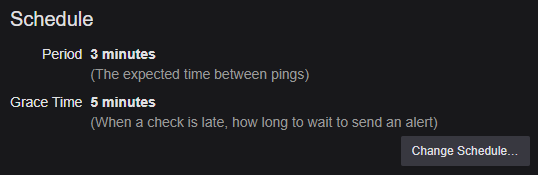
Now if the host reports a problem, dies, or goes offline — I get notified. I also get notified if the server loses internet access; as it can no longer reach Healthchecks.io, but I see that more as a feature than a bug.
Healthchecks.io even produces some fine looking badges — showing the Proxmox host status. This allows internally monitored services to be shown publicly, like I’m doing on my DIY status page.
Systemd
I first used cron to run the health probe script every two minutes, but it flooded my syslog with entries. So instead I made a systemd service, and timer.
The service is fairly simple, the HEALTH_PULSE_URL variable in the service definition allows the actual script file to be identical on all servers.
Notice the LogLevelMax=notice line, this makes sure that nothing is logged in case everything is OK.
[Unit]
Description=Ping monitoring probe
After=network-online.target

[Service]
Type=oneshot
Environment="HEALTH_PULSE_URL=https://hc-ping.com/xxxxxxxx-xxxx-xxxx-xxxx-xxxxxxxxxxxx"
ExecStart=/usr/local/bin/updown-pve-health.sh
LogLevelMax=notice

[Install]
WantedBy=default.target
And a timer to trigger the service at certain intervals:
[Unit]
Description=Ping monitoring probe
RefuseManualStart=no
RefuseManualStop=no

[Timer]
OnCalendar=*:0/2

[Install]
WantedBy=timers.target
Now if Beszel dies, or a host freezes, becomes unhealthy or goes offline — I’ll be notified within a few minutes.