D-Link DGS-1210-28P initial setup

D-Link DGS-1210-28P initial setup

The Unifi UAP-AC-M access point in my garage stopped working a few weeks ago. Or, the device didn’t stop working, it still showed up in the Unifi controller and I could ping it. But it stopped providing Wi-Fi connectivity — my phone connected, but got no network access…

I remembered experiencing this before — the VLANs for user and guest Wi-Fi wasn’t allowed through the D-Link switch. I had simply not configured them, but why was it failing now?

Trying to log into the switch — I found that it no longer got an IP from the DHCP server. By all accounts; it looked like the switch had been reset.

Read more →

A few Wi-Fi improvements

A few Wi-Fi improvements

After my Wi-Fi mapping adventure — I found a few spots with low Wi-Fi signal. Both kids’ rooms on the 2nd floor only had mediocre signal, at -67 and -68 dBm 2.4 GHz, and the side garden had -71 dBm — which is terrible!

I also discovered that Mona’s side of the bed had much worse Wi-Fi signal than my side. This was because I had a clear line of sight to the UAP-AC-IW in the den, but the signal to Mona’s side had to go through a wall and her wardrobe…

Simply not acceptable, something had to be done!

Read more →

Downgrading Unifi APs from 5.43.43 to 4.3.28
Downgrading Unifi APs from 5.43.43 to 4.3.28

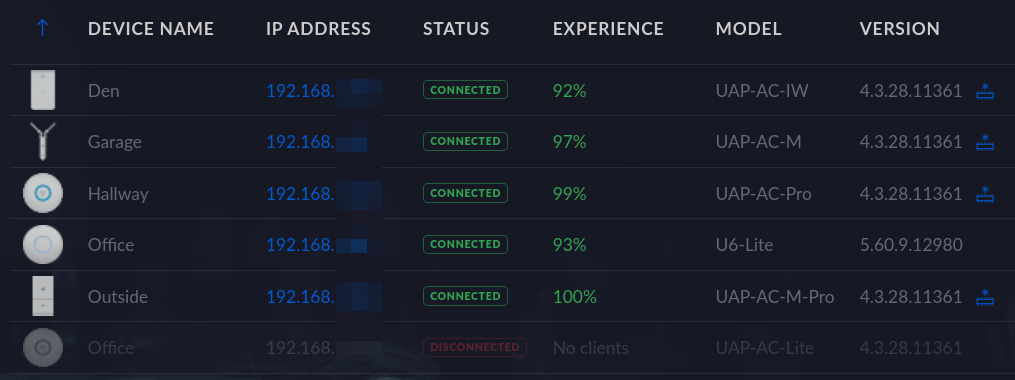
Shortly after I upgraded my Unifi access points from 4.3.28 to 5.43.43; I started getting timeout issues. Not all devices, but some; the Raspberry Pi driving our DAKboard, and both our Netatmo air quality sensors.

It took me a while to understand what was happening, and I didn’t immediately relate it to the firmware upgrade.

Read more →

Troubleshooting the garage access point

Troubleshooting the garage access point

Ever since I ran a underground CAT6 to my garage — my Unifi UAP-AC-M access point have been acting strange…

I initially noticed that whenever I was close to the garage; I would loose internet connectivity for a few seconds. At first I just thought it was an area with poor coverage, but looking at the signal strengths that didn’t make any sense.

Read more →

Mapping the Wi-Fi coverage in my house and garden

Mapping the Wi-Fi coverage in my house and garden

I walked around my house, and garden — measuring the Wi-Fi signal. Here are the results 👇

Read more →

My home Ethernet wiring

My home Ethernet wiring
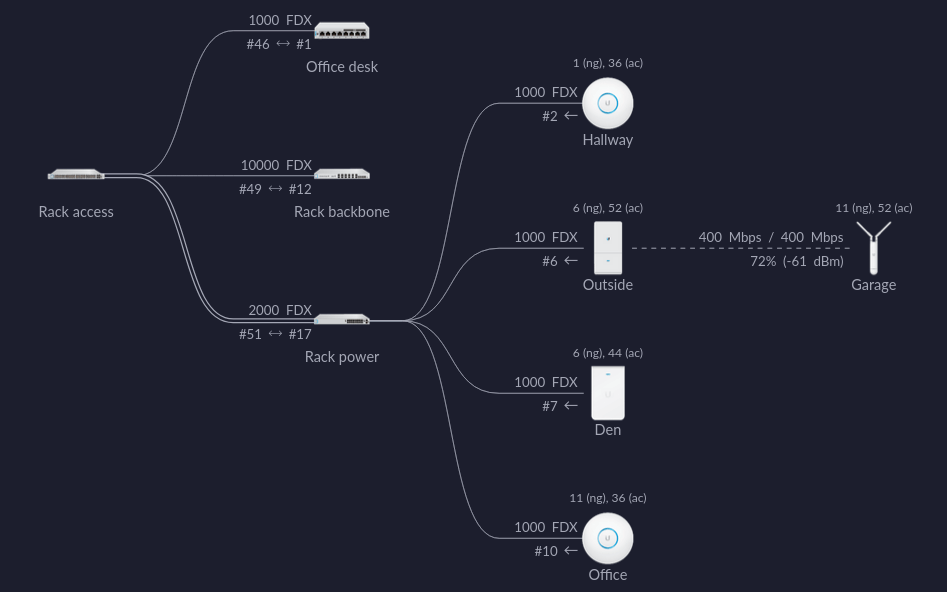
Home network, screen shot from the Unifi controller

When we bought our house last year; it had lots of coax and telephone outlets, with conduit in the wall connecting them. I have no use for these outlets, but the wall boxes and conduits can be repurposed for Ethernet cables 🙂

All Ethernet cables goes to the patch panel in my home office.

Read more →

Kids traffic light, with Raspberry Pi Zero W

Kids traffic light, with Raspberry Pi Zero W

As the weather is warming up here in Norway — my kids have gotten their bikes out. To make it more fun, both for them and me, I figured I’d build a series of traffic signals that they could play with.

I first started with a traffic light, simple — red, yellow and green. To control it I am using a Raspberry Pi Zero W, this will allow me to make it communicate on Wi-Fi and MQTT later.

Read more →

Network infrastructure upgrade, UniFi FTW!

Network infrastructure upgrade, UniFi FTW!

When watching a few Linus Tech Tips videos on YouTube, I noted that he mostly used UniFi wireless access points. So I started reading about this series of products, and it didn’t take long fore I realized that I had to have it. I was already looking to replace my current router, as I wanted the WiFi access point to be placed more central in the house. And that didn’t work with a combined router and WiFi device. In the end, I replaced all my network infrastructure 😛

Read more →