Posts tagged: network-cabling
Finally getting fiber between the house and garage

Getting network to the garage is a story with many chapters. I started out with Wi-Fi mesh, then CAT6 — and now, finally, fiber!
Running CAT6 to the 2nd floor den — another interior wall

I first got started on the network run from the attic switch to the 2nd floor den — back in October of 2021. I finished it a year later, so it’s about time to get this blog post published 😛
Running CAT6 to the twins' rooms — inside interior wall

We recently moved the twins into their own bedrooms, after sharing a room for nine years — it was finally time for some privacy 🙂 With their own rooms; they also got their own computers — a life long …
Pulling CAT6 cable in existing conduit

We recently put up a wall in our previous family/play room — to make another bedroom, with a hallway outside. I might want an access point in that hallway at some point. So I repurposed a telephone …
A few Wi-Fi improvements

After my Wi-Fi mapping adventure — I found a few spots with low Wi-Fi signal. Both kids’ rooms on the 2nd floor only had mediocre signal, at -67 and -68 dBm 2.4 GHz, and the side garden had -71 dBm — …
Two CAT6 cables and a fiber — from the basement to the attic

Since we first moved into this house — I’ve wanted to ceiling mount a Wi-Fi access point on the 2nd floor. But getting a network cable to the attic was challenging, so instead I opted for a Unifi …
Moving CAT6 cable for access point; inside the wall

The first network run I did in this house — was to the hallway access point. It ran along the basement stairwell ceiling, through the basement, and into the home office. Since I’m already running …
Running three CAT6 cables to the living room TV bench

Ever since we bought the house, last year, I’ve been planning to run wired network to the living room TV and media center — it’s time to finally get that done 🙂
Running two CAT6 cables to the play room

We recently got a family computer in our play room, and it of course needs network. So I ran a 20 mm conduit from the basement, through the kitchen, to the play room, and pulled two CAT6 cables.
Running underground CAT6 to detached garage

I dug a 10 meter trench to get wired network to my detached garage. Then installed a rack cabinet and PoE switch. Here is the build log 👇
My home Ethernet wiring
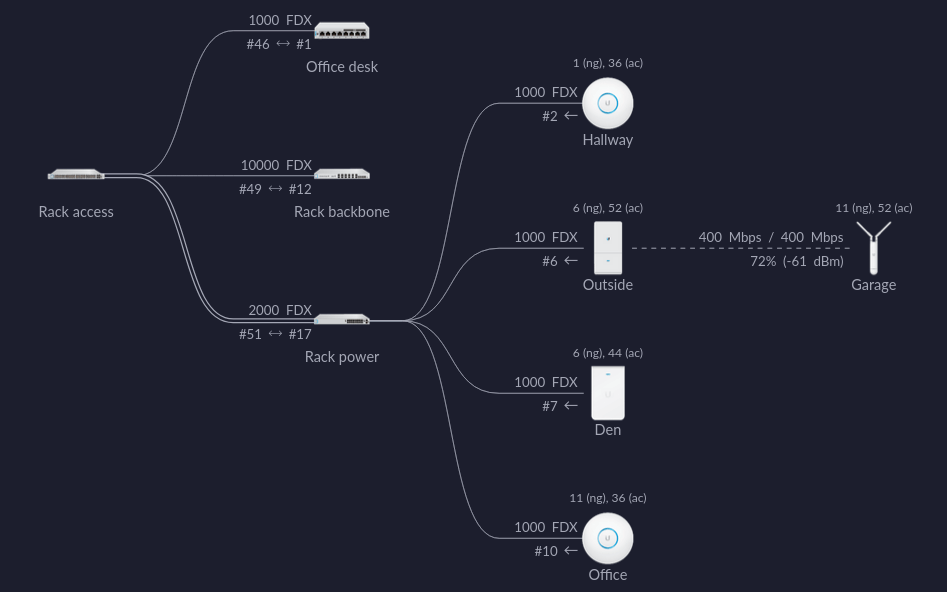
When we bought our house last year; it had lots of coax and telephone outlets, with conduit in the wall connecting them. I have no use for these outlets, but the wall boxes and conduits can be …